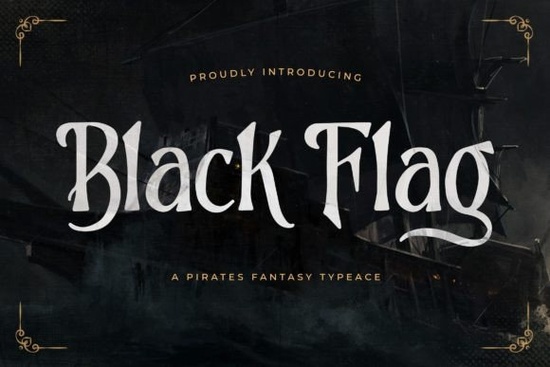
A design that calls for a bold, weathered look like a pirate ship's flag, an old treasure map, or a dark fantasy game logo needs more than just any bold font. Black Flag is a pirate fantasy display font crafted to give that exact rough, adventurous feel the moment someone glances at your work. Whether you’re creating product mockups for a print-on-demand store, designing a title for a YouTube let’s play channel, or building branding for a Renaissance faire booth, the right typeface sets the entire tone. Black Flag Font leans heavily into a pirate aesthetic with sharp, irregular serifs and a slightly uneven baseline that mimics hand-lettered signage, making it an instant fit for any project that needs a storybook or swashbuckling edge.
It helps that the font is PUA encoded, which means you don’t need professional design software to unlock its full character set. All of the extra glyphs, swashes, and ligatures are easy to reach through a standard character map or the glyphs panel in your favorite design tool. This turns a simple title into something far more decorative in just a few clicks.
What exactly makes a pirate display font feel authentic?
Pirate-themed fonts tend to mimic the kind of lettering you might find on old cargo crates, inked onto parchment, or carved into driftwood. Black Flag does this with a mix of sharp, angled terminals and slightly irregular strokes. The letterforms look intentionally worn, with subtle distress that gives the impression of weather‑beaten wood or rough cloth. This organic variation helps a static design feel alive perfect when you want your poster, t‑shirt graphic, or thumbnail to stand out as something handcrafted, not sterile.
Because it’s a display font, Black Flag works best at larger sizes. Use it for headlines, logo marks, main titles, or anywhere you need a maximum of two lines of text. If you try to set an entire paragraph in it, the pirate charm may become hard to read. Pair it with a clean sans‑serif like Open Sans or Montserrat for body copy, and let Black Flag handle all the dramatic hooks.
How to install Black Flag and actually access those extra glyphs
Once you download the font, installation is standard: double‑click the OTF or TTF file and hit “Install” on Windows, or open it in Font Book on a Mac. The real magic, however, lies in the extended character set. Because it’s PUA (Private Use Area) encoded, all the alternative characters are mapped to codes that your software can read. In Photoshop, Illustrator, or Affinity Designer, open the Glyphs panel to see every swash, stylistic alternate, and ligature at a glance. In Cricut Design Space or Silhouette Studio, you can copy glyphs from a character map (like Windows Character Map or Font Book’s viewer) and paste them directly onto your canvas.
A quick tip: look for ligatures that combine double letters common in pirate words like “booty,” “breeze,” or “reef.” Black Flag often has special pairings that join these into a single, flowing mark, making the text feel genuinely hand‑inked.
Where does Black Flag font really shine?
Print‑on‑demand sellers are especially fond of this style. A distressed fantasy font on a mug, hoodie, or tote bag immediately taps into the adventure niche, whether you’re targeting pirate lovers, Renaissance fair attendees, or tabletop RPG communities. Game developers also use this kind of typeface for indie title screens, loading screens, or icon text, because it gives an instant old‑world fantasy vibe without requiring custom lettering.
- Pirate‑themed party invitations and banners: Set the event name in Black Flag and keep all the details in a simple serif for a professional yet festive look.
- Book covers and ebook mockups: Especially for historical fiction, middle‑grade adventure, or fantasy romance with a nautical twist.
- YouTube and Twitch overlays: Use it for a stream starting soon screen or a pirate‑themed gaming logo to attract viewers who love retro or adventure games.
- Wooden signs and laser engraving: The distressed edges translate beautifully when etched into wood or acrylic.
Are there similar display fonts you can pair with Black Flag?
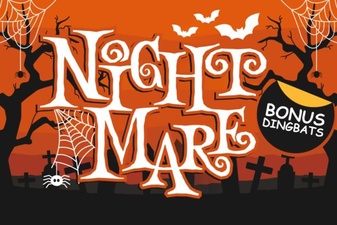
Sometimes a single typeface isn’t enough you might need a secondary font for captions, tags, or a complementary vibe. Our collection of display fonts includes several relatives that follow a similar adventurous thread. Spooky Season leans more into Halloween with jagged, scream‑worthy outlines, making it a solid partner if your design bridges pirate and horror themes. For a rough, unpolished serif that still feels old‑world, Monsante offers a darker, almost medieval texture. If your project has a retro‑game element, Flashbit brings an 8‑bit pixel look that can contrast sharply with Black Flag’s hand‑drawn quality. And when you need something that whispers ghostly tales rather than shouting “Arrr!,” Night Mare delivers a haunting, scratchy aesthetic that works beautifully for darker fantasy designs.
You can find a full breakdown of Black Flag’s character set, along with more sample projects, in our detailed look at the Black Flag font. It’s a handy resource if you want to see how the ligatures behave in different software or to grab a few layout ideas before you start designing.
How to get the best out of Black Flag’s ligatures and alternates
To truly make the font feel custom, experiment with mixing standard letters and stylistic alternates. For example, the uppercase “B” might have a swash version that trails off like a pirate’s coat in the wind. Swap it in to give a logo an extra hand‑crafted detail. The same goes for double‑letter ligatures typing “tt” or “ss” could reveal a completely different shape than what you’d expect, which adds to the illusion that a calligrapher wrote or painted the text.
Try these quick steps in your design software:
- Type your text in Black Flag.
- Open the OpenType panel (or Glyphs panel) and select “Stylistic Alternates” to see if certain letters have a second form.
- Manually replace individual characters with alternates to break up the repetition and give a more organic feel especially useful when a word contains the same letter twice.
- Check for standard ligatures like “fi,” “fl,” and “ff,” and enable them under the OpenType features if they aren’t on by default.
Even a few swapped glyphs can transform a basic wordmark into something that looks like a professional lettering commission. That level of detail matters when you’re selling printable designs, offering custom products, or trying to stand out on a crowded marketplace.
Next step: Grab the font, fire up your glyphs panel, and create a small mockup using the alternate characters. Within a few minutes you’ll see exactly why fans of pirate‑themed design keep returning to this adventure‑ready display typeface.
Try It Free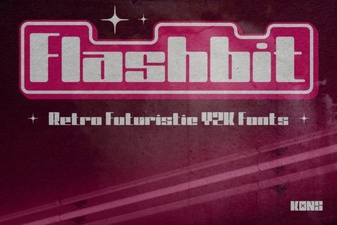 Flashbit Font – Playful Pixel Type for Creative Projects
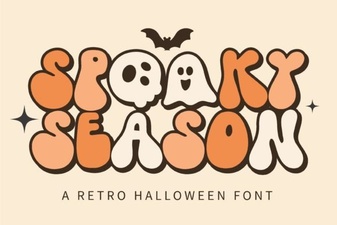 Spooky Season Font: Creative Ideas & Best Typography Picks
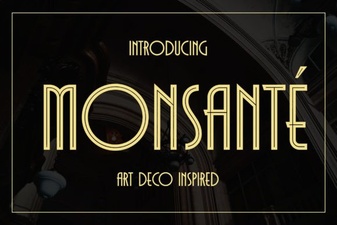 Discover Monsante Font for Elegant Design Projects
 Abcd Tracing Font Bundle for Learning & Crafting
 Night Mare Font: Creative Uses for This Spooky Typeface
 Western Bold Font in Modern Typography Design